When Windows boots there is no icons on desktop until you right click desktop and choose View->Show Desktop Icons. You have to do this every time your computer reboots.
It seems pretty illogical, but to fix this try changing you Power Options between different power plans and see if it helps.
2008-12-14

How to disable Hibernate on Windows Vista
For some space saving on your hard drive or maybe some other reason, you might want to disable hibernate functionality on your PC.
To do this:
Open cmd with administrator privileges (navigate to C:\windows\system32\ find cmd.exe, right click it and choose Run as Administrator)
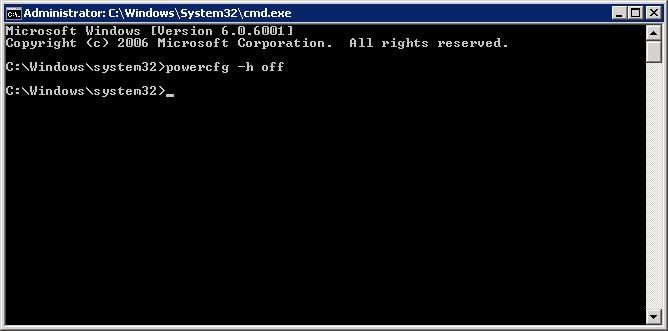
Enter command "powercfg -h off" and hit Enter (screenshot)
Links:
http://www.windowsnetworking.com/kbase/WindowsTips/WindowsVista/AdminTips/Misc/Disablehibernation.html
To do this:
Open cmd with administrator privileges (navigate to C:\windows\system32\ find cmd.exe, right click it and choose Run as Administrator)
Enter command "powercfg -h off" and hit Enter (screenshot)
Links:
http://www.windowsnetworking.com/kbase/WindowsTips/WindowsVista/AdminTips/Misc/Disablehibernation.html
2008-12-09
Can not open SQL Server Management Studio
When trying to open SQL Server Management Studio for SQL Server 2005, I get error message:
Package 'Microsoft SQL Management Studio Package' failed to load.
Fixed this by reinstalling .Net Framework 2.0.
Downloads:
.Net Framework 2.0
Links:
http://forums.microsoft.com/MSDN/ShowPost.aspx?PostID=4224101&SiteID=1&mode=1
Package 'Microsoft SQL Management Studio Package' failed to load.
Fixed this by reinstalling .Net Framework 2.0.
Downloads:
.Net Framework 2.0
Links:
http://forums.microsoft.com/MSDN/ShowPost.aspx?PostID=4224101&SiteID=1&mode=1
2008-11-26
Removing last Exchange 2007 server from your organization
Had to uninstall exchange serve from SBS 2008, as it was the last Exchange server in organization I encountered number of problems trying to uninstall it.
One of those problems are that you cannot uninstall Exchange server while it contains Public Folder Replicas and you can't move them to another server because there is none.
Browsing the web I was finally able to solve this problem, for full artcile just follow the link and read the comments.
Here's summary:
1. You'll have to keep at least one mailbox with administrator rights.
2. Open Power-Shell and enter the following commands:
Get-PublicFolder -Server "\" -Recurse -ResultSize:Unlimited | Remove-PublicFolder -Server -Recurse -ErrorAction:SilentlyContinue
Get-PublicFolder -Server "\Non_Ipm_Subtree" -Recurse -ResultSize:Unlimited | Remove-PublicFolder -Server -Recurse -ErrorAction:SilentlyContinue
3. Remove all mailboxes on your server.
4. Remove Exchange 2007 server from "Programs and Features" in control panel.
Links:
http://blogs.technet.com/asiasupp/archive/2007/06/26/public-folder-replicas-prevent-uninstall-exchange-2007.aspx
One of those problems are that you cannot uninstall Exchange server while it contains Public Folder Replicas and you can't move them to another server because there is none.
Browsing the web I was finally able to solve this problem, for full artcile just follow the link and read the comments.
Here's summary:
1. You'll have to keep at least one mailbox with administrator rights.
2. Open Power-Shell and enter the following commands:
Get-PublicFolder -Server
4. Remove Exchange 2007 server from "Programs and Features" in control panel.
Links:
http://blogs.technet.com/asiasupp/archive/2007/06/26/public-folder-replicas-prevent-uninstall-exchange-2007.aspx
Cannot access folder "Access Denied"
In cases when you need to access folder, but get "Access Denied" message even when you're logged on as an Administrator, you'll have to take ownership of that folder.
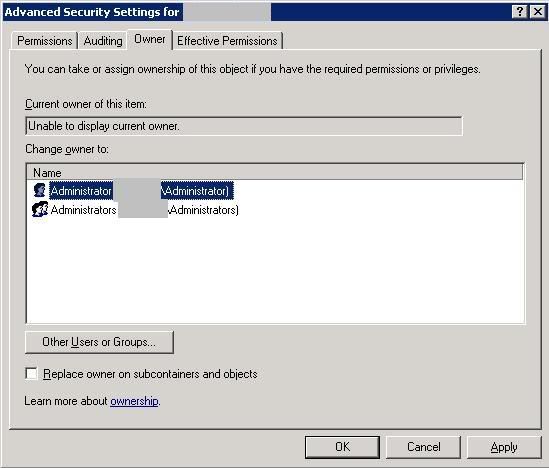
To do this in Windows Server 2003 open folder Properties, select Security tab and click on Advanced button, then hop on Owner tab. Now select user which will be the new owner of this folder and click OK (screenshot).
Links:
http://www.lockergnome.com/windows/2005/10/04/take-ownership-of-a-folder-in-server-2003/
To do this in Windows Server 2003 open folder Properties, select Security tab and click on Advanced button, then hop on Owner tab. Now select user which will be the new owner of this folder and click OK (screenshot).
Links:
http://www.lockergnome.com/windows/2005/10/04/take-ownership-of-a-folder-in-server-2003/
Subscribe to:
Posts (Atom)